Back to "How it works"
Order walkthrough · sanus+
The order form — click by click.
Ten steps, each with a screenshot from the real order form. Keep this page open on one device and sanus+ on a second — then you can click along in parallel. On phone: just switch tabs back and forth.
Note: the screenshots show the German sanus+ form. Our explanation translates every field, so you can fill it in confidently even if your German is shaky.
Before you start
What to have ready for the next 5 minutes.
- Recognised Pflegegrad 1–5
- Health insurance card of the person needing care
- Date of birth & address of the insured person
- A quiet minute — but really, 5 minutes is enough
External link to sanus+ · Affiliate, doesn't shape our recommendation.
01
Build your box.
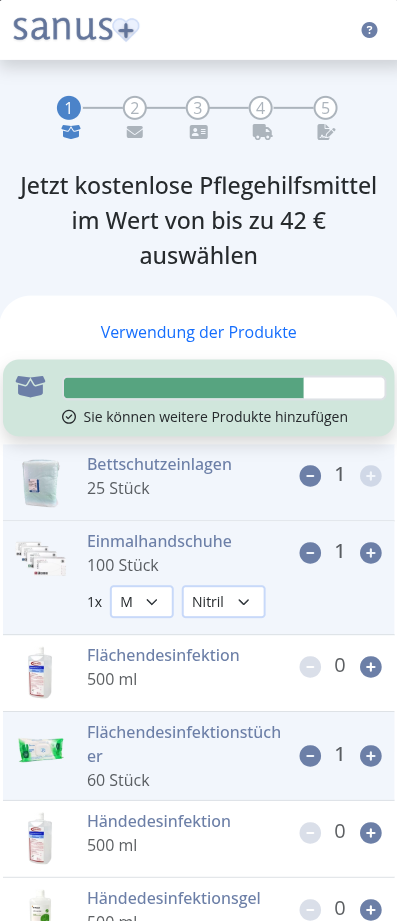
Click through the product categories and add the supplies you actually need day-to-day — gloves, disinfectant, bed pads, aprons. At the top you'll see a progress bar showing how much of your monthly budget you've already used. When the bar fills up, the €42 are spent.
02
Reusable bed pads?
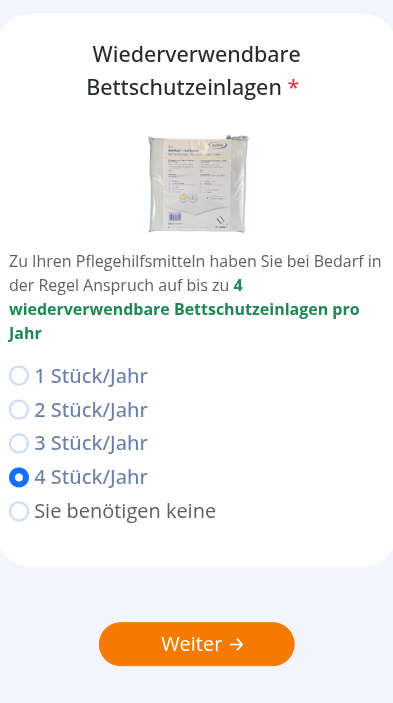
Here you're asked whether you want reusable bed protection pads (instead of single-use). Reusables run on a separate quota — you get them in addition to the regular consumables.
If unsure: leave the default (single-use). You can change it at any future order.
If unsure: leave the default (single-use). You can change it at any future order.
03
Your contact details.
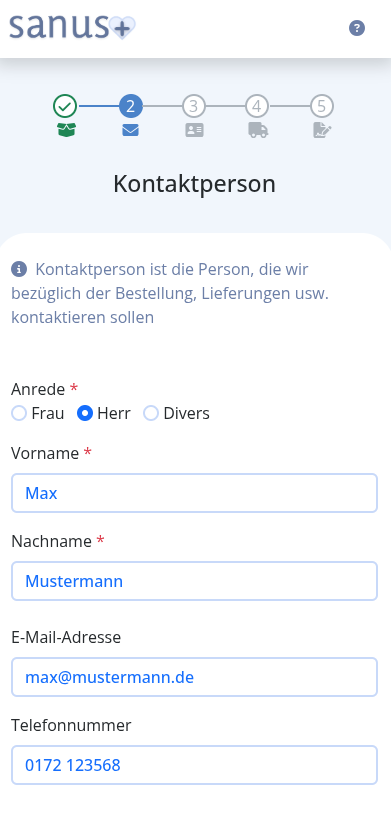
Enter your own contact info — the person filling in this form. That is not necessarily the person needing care. In the next step, you'll tell sanus+ which role you're acting in (the insured person yourself, a relative, or a caregiver).
04
Who is ordering for whom?
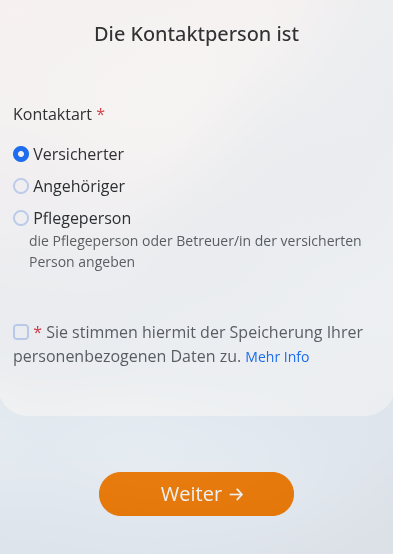
Three options:
1. The insured person themselves — you are the person needing care, ordering for yourself.
2. A relative — you're ordering for a family member (most common case).
3. A caregiver — you care for someone professionally or as a volunteer and order on their behalf.
You also have to accept the privacy policy — without the checkbox you can't continue.
1. The insured person themselves — you are the person needing care, ordering for yourself.
2. A relative — you're ordering for a family member (most common case).
3. A caregiver — you care for someone professionally or as a volunteer and order on their behalf.
You also have to accept the privacy policy — without the checkbox you can't continue.
05
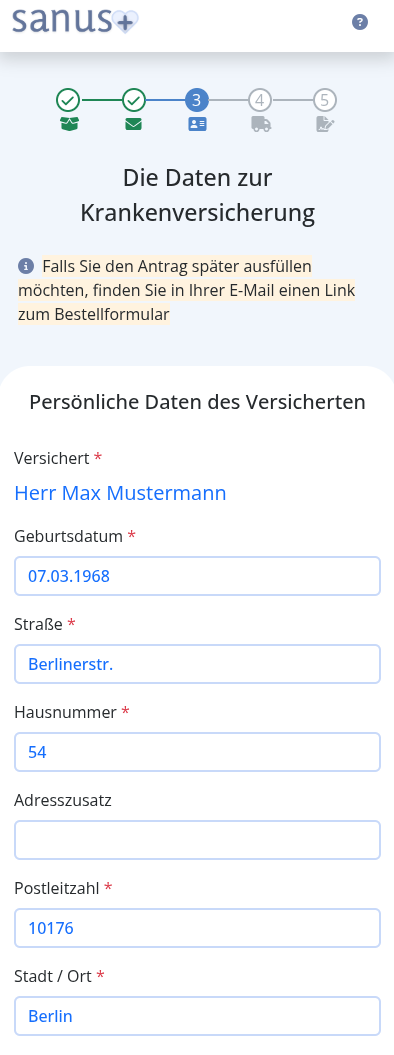
Details of the person needing care.
If you're not the person needing care yourself (step 4 = relative or caregiver), you now need their details: name, date of birth and address.
The address must match what the Pflegekasse has on file. If they recently moved, register the new address with the Pflegekasse first.
The address must match what the Pflegekasse has on file. If they recently moved, register the new address with the Pflegekasse first.
06
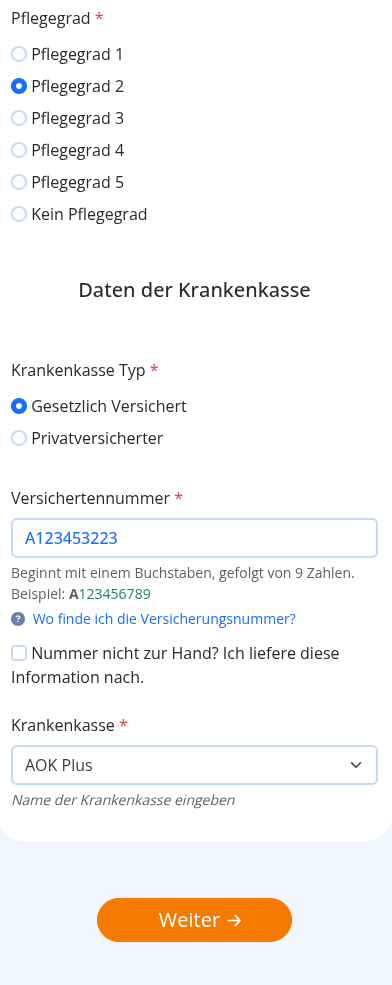
Pflegegrad & insurance number.
Now the most important part. Pick the Pflegegrad (1 to 5) — the level is on the MDK assessment letter (or the latest letter from the Pflegekasse). Then enter the insured person's Versichertennummer (insurance number) and choose the Pflegekasse (AOK, Barmer, TK, DAK, …).
Typos here delay the approval by days. Double-check.
Typos here delay the approval by days. Double-check.
07
Delivery address & timing.
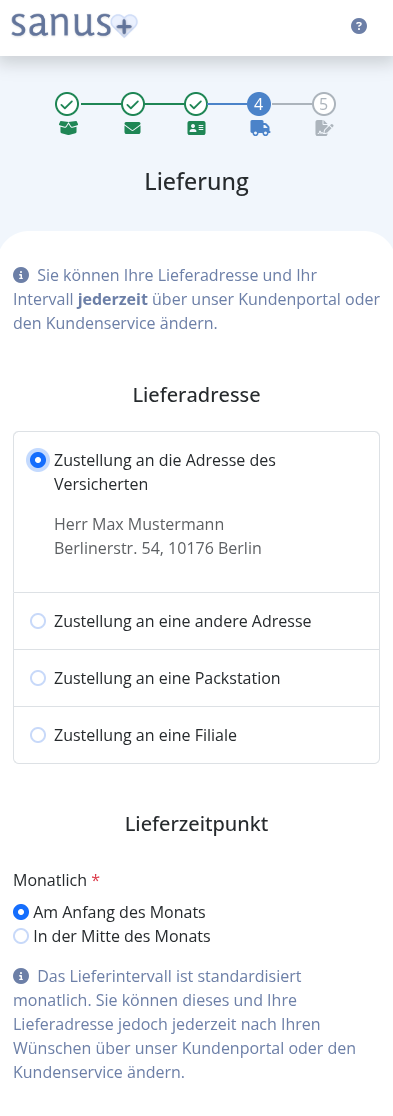
Where should the box arrive?
Default: the address of the insured person (step 5).
Different address: send it to you, e.g. if you visit daily and the box is safer there.
You also pick the delivery window: beginning or middle of the month. This only changes when the doorbell rings — it does not affect the monthly budget.
Default: the address of the insured person (step 5).
Different address: send it to you, e.g. if you visit daily and the box is safer there.
You also pick the delivery window: beginning or middle of the month. This only changes when the doorbell rings — it does not affect the monthly budget.
08
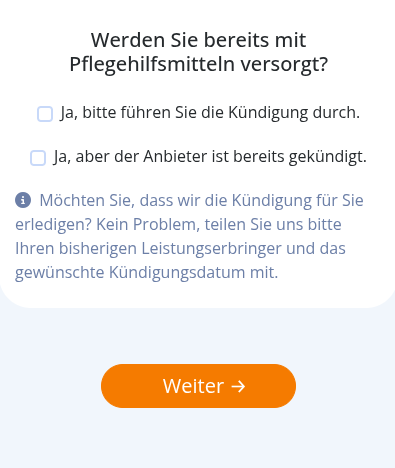
Already getting a box from another provider?
This question is only relevant if you currently receive monthly care boxes from a different provider (e.g. Curabox, PflegePaket) and want to switch to sanus+.
09
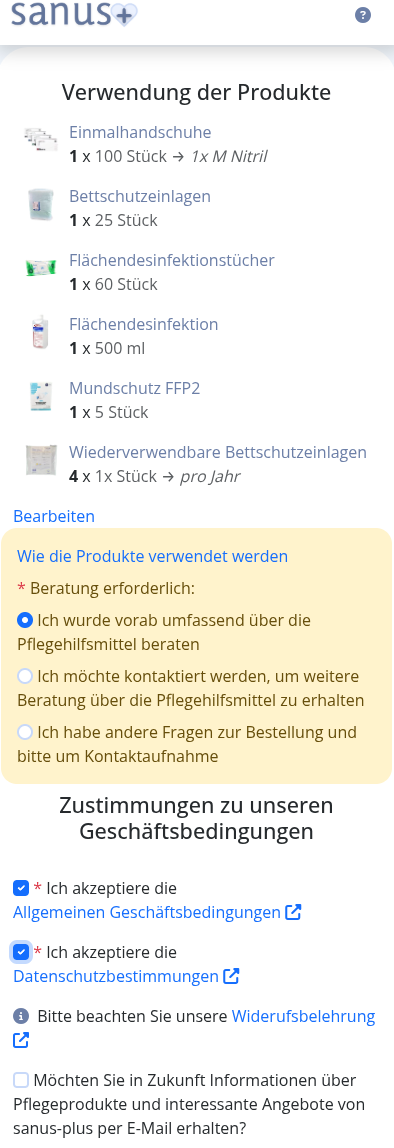
Review your details.
sanus+ shows you everything for review. Go through it carefully — typos in the insurance number or address are the most common reason for a delayed approval.
Optional: request a free care consultation from sanus+ if you have questions (call or email). Accepting the terms and privacy policy is mandatory — without the checkboxes you can't continue.
Optional: request a free care consultation from sanus+ if you have questions (call or email). Accepting the terms and privacy policy is mandatory — without the checkboxes you can't continue.
10
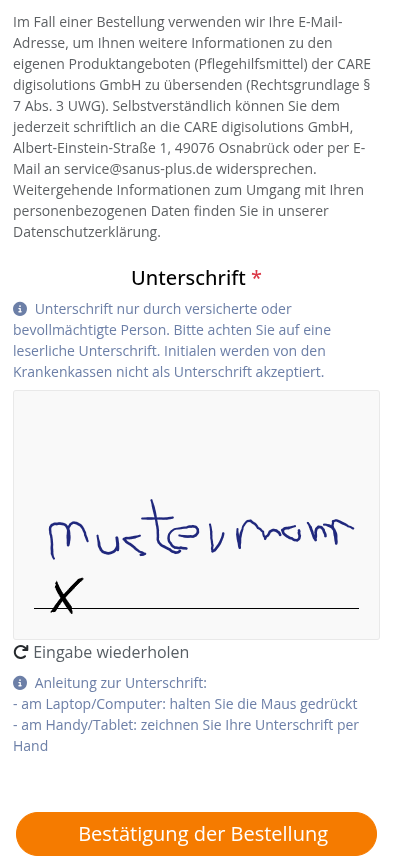
Sign & submit.
Final step. With your digital signature (finger or mouse) you authorise sanus+ to ship the monthly box and bill your Pflegekasse directly. You don't pay anything out of pocket — the Pflegekasse pays sanus+, sanus+ delivers the box.
After signing, the application is automatically forwarded to the Pflegekasse. Approval typically takes 5–10 working days. Then your first box arrives — and after that, automatically every month.
After signing, the application is automatically forwarded to the Pflegekasse. Approval typically takes 5–10 working days. Then your first box arrives — and after that, automatically every month.
Done.
That's it. Really.
Now the Pflegekasse reviews your application — typically 5 to 10 working days. Your first box arrives after that, and from then on automatically every month. You don't need to sign anything else or renew. You can adjust the box contents any time in your sanus+ account.